}
;
return inner;
};
Instead of polling the API for changes, register an endpoint and Palm pushes events to you. Webhooks deliver events from all Palm products through a single integration — verification results, monitoring alerts, and compliance updates all arrive at the same endpoint.
***
## Setting up a webhook
When you create a webhook in Palm Console, you specify:
* **URL** — The HTTPS endpoint that will receive events. HTTP is not supported.
* **Events** — The event types you want to subscribe to.
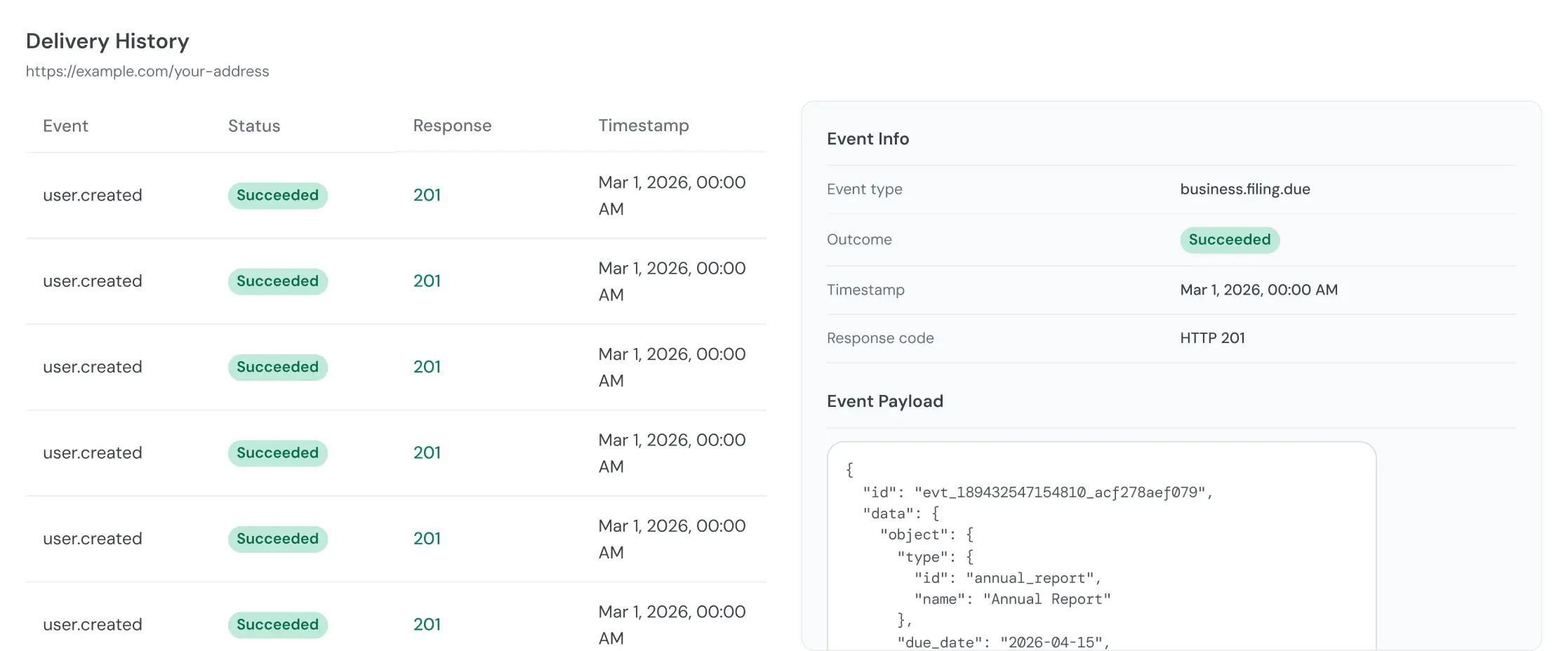
Palm generates a signing secret (format: `whsec_...`) at creation time. This secret is returned once — store it securely. You'll need it to verify that incoming requests are from Palm.
## Event format
All events follow a consistent naming pattern:
```
{resource}.{action}
{resource}.{sub_resource}.{action}
```
Every event payload contains:
| Field | Description |
| ----------------------------------------------------------- | ---------------------------------------------------------------------------------------------------------------------------- |
| `id` | Unique event identifier. Use for idempotency. |
| `object` | Always `event`. |
| `type` | The event type (e.g., `user.verification.completed`). |
| `mode` | `test` or `live` — the mode of the action that produced the event. An event is delivered only to endpoints of the same mode. |
| `created_at` | ISO 8601 timestamp. |
| `data` | Event-specific payload. Structure depends on event type. |
## Event catalog
**A note on naming:** Webhook event types use `user` (e.g., `user.verification.completed`); elsewhere the docs may refer to a "person." These are the same entity — the event names reflect the API resource name.
### Verification events
Fired when verification processing completes. Payloads include the verification ID, risk level, match results, and — for business verification — associate results.
| Event | Description |
| -------------------------------------------------------------------------------- | ----------------------------------------------------------------- |
| `user.verification.completed` | User verification finished. |
| `business.verification.completed` | Business verification finished. Includes associate-level results. |
### Monitoring events
Fired when Palm detects a change in a monitored business's authoritative record. These events only fire for businesses enrolled in [Monitor](/monitor/overview).
| Event | Description |
| ------------------------------------------------------------------------------ | --------------------------------------------------------------------------------------------------------------------------------- |
| `business.registration.updated` | Registration data changed (status, name, address, officers, filings). Includes structured diffs with previous and current values. |
| `business.filing.due` | A compliance filing deadline is approaching. |
| `business.filing.overdue` | A compliance filing deadline has passed. |
### Filing events
Fired when a [Comply](/comply/overview) filing changes status. These events cover formations, EIN applications, and other filing types.
| Event | Description |
| --------------------------------------------------------------------- | ------------------------------------------------------------------------------------------------------------ |
| `filing.queued` | Filing received and validated. Preparing for submission. |
| `filing.ready_to_file` | Filing is ready to be processed. |
| `filing.processing` | Filing is being prepared for submission to the authority. |
| `filing.filed` | Filing has been submitted and is being processed. |
| `filing.completed` | Filing is done as the authority accepted the filing. Result available (registration number, EIN, documents). |
| `filing.canceled` | Filing was canceled. Includes `status_reason`. |
**Routing by filing type.** Every filing event payload includes `data.object.type`:
| `data.object.type` | Filing |
| ---------------------------------------------------------- | ---------------------------- |
| `formation` | LLC or corporation formation |
| `ein` | EIN application |
Registered agent is **not** a filing. It is a standalone resource with its own status lifecycle and its own `registered_agent.*` events — see [Registered agent events](#registered-agent-events). On a formation it appears in the `related_items` bundle as a `registered_agent` item, never as a filing.
### Case events
Fired when Palm opens or updates a case requesting information to complete a filing. See [Cases](/comply/cases).
| Event | Description |
| -------------------------------------------------------------- | ---------------------------------------------------------------------------------------------- |
| `case.opened` | Palm opened a case and needs your response. |
| `case.updated` | An open case changed — for example, your response was received and it moved to `under_review`. |
| `case.resolved` | The case closed (`resolved` or `superseded`). |
### Platform events
Fired when entities are created or removed through the API.
| Event | Description |
| ----------------------------------------------------------------- | ----------------------- |
| `user.created` | A person was created. |
| `user.removed` | A person was removed. |
| `business.created` | A business was created. |
| `business.removed` | A business was removed. |
### Document events
Fired when Palm attaches a document to one of your resources on its own initiative — a filing artifact or forwarded registered-agent mail. Does not fire for documents you upload yourself.
| Event | Description |
| ----------------------------------------------------------------- | ------------------------------------------------------------------------------------------------------------------------------------------------------------------------------ |
| `document.created` | Palm attached a new document to one of your businesses. `data.object` is the document; route on its `type` (e.g., `certificate_of_formation`, `ein_letter`, `notice`, `mail`). |
### Registered agent events
Registered agent is a standalone resource, not a filing. It carries the registered-agent record on `data.object` and moves through its own status lifecycle (`pending` → `active` → `termination_requested` → `terminated`, plus `failed`). It never emits `filing.*` events.
| Event | Description |
| --------------------------------------------------------------------------------------- | ----------------------------------------------------------------------------------------------------------------------------------------------------- |
| `registered_agent.activated` | Palm became the registered agent for a business (formation provisioning completed, or a change into Palm). Status is `active`. |
| `registered_agent.failed` | Provisioning (or a required state submission) failed on the assignment path; status moved to `failed`. `data.object.rejection_reason` explains why. |
| `registered_agent.changed` | The registered agent moved to another provider; status is `terminated`, `provider` is `external`. |
| `registered_agent.change_failed` | A partner-requested change could not be completed; status reverts to `active` (Palm remains the RA). `data.object.rejection_reason` explains why. |
| `registered_agent.termination_requested` | You requested that Palm stop serving as the registered agent; status moved to `termination_requested`. Palm keeps forwarding mail until it completes. |
| `registered_agent.terminated` | Palm is no longer the registered agent on file; status moved to `terminated`. |
| `registered_agent.termination_failed` | A termination could not be completed; status reverts to `active`. `data.object.rejection_reason` explains why. |
## Example payloads
Every event type has a complete, realistic example payload — including each variant (formation vs. EIN filings, each registered-agent state, `case.resolved`, `*.removed`, `business.filing.overdue`) — in the dedicated [Webhook example payloads](/developer-guide/webhook-example-payloads) reference.
## Verifying signatures
All webhook payloads are signed using HMAC-SHA256. Always verify signatures before processing events.
Palm sends three headers with every delivery:
| Header | Description |
| ---------------------------------------------------------------- | ----------------------------------------- |
| `Palm-Signature` | Format: `t={timestamp},v1={signature}`. |
| `Palm-Webhook-Id` | The webhook endpoint receiving the event. |
| `Palm-Event-Type` | The event type being delivered. |
To verify:
1. Extract the timestamp (`t`) and signature (`v1`) from the `Palm-Signature` header.
2. Check the timestamp is within 5 minutes of current time. Reject stale timestamps to prevent replay attacks.
3. Construct the signed payload: `{timestamp}.{raw_request_body}`.
4. Compute HMAC-SHA256 using your webhook secret (`whsec_...`).
5. Compare your computed signature with the `v1` value using constant-time comparison.
Do not skip signature verification, even in development. Unsigned requests could come from anywhere.
## Retries and delivery
**Timeout** — Your endpoint must respond within 10 seconds. Return a 2xx immediately, then process the event asynchronously.
**Retry schedule** — If your endpoint returns a non-2xx status or times out, Palm retries:
| Attempt | Delay |
| --------- | ---------- |
| 1st retry | 1 minute |
| 2nd retry | 5 minutes |
| 3rd retry | 30 minutes |
| 4th retry | 2 hours |
After 5 total attempts (1 original + 4 retries), Palm marks the delivery as `failed`.
**Auto-disable** — If a webhook accumulates 10 consecutive failed deliveries across any events, Palm automatically disables it. Check webhook execution logs in Palm Console to monitor delivery health.
## Idempotency
Palm may deliver events more than once. Use the event `id` field to deduplicate. If your processing is not naturally idempotent, store processed event IDs and skip duplicates.
## Best practices
* **Respond fast, process later.** Return a 2xx immediately and handle the event asynchronously. Heavy processing that exceeds the 10-second timeout will trigger retries and eventually disable your webhook.
* **Always verify signatures.** Validate the `Palm-Signature` header on every request. This is your only guarantee the event came from Palm.
* **Deduplicate with event IDs.** Network issues can cause duplicate deliveries. Store the `id` from each processed event to avoid processing it twice.
* **Subscribe selectively.** Only subscribe to events you act on. If you don't need `user.created` events, don't subscribe — it reduces noise and load on your endpoint.
* **Monitor delivery health.** Check webhook execution logs in Palm Console regularly. A pattern of failures usually means your endpoint is slow or returning errors.
## Next steps