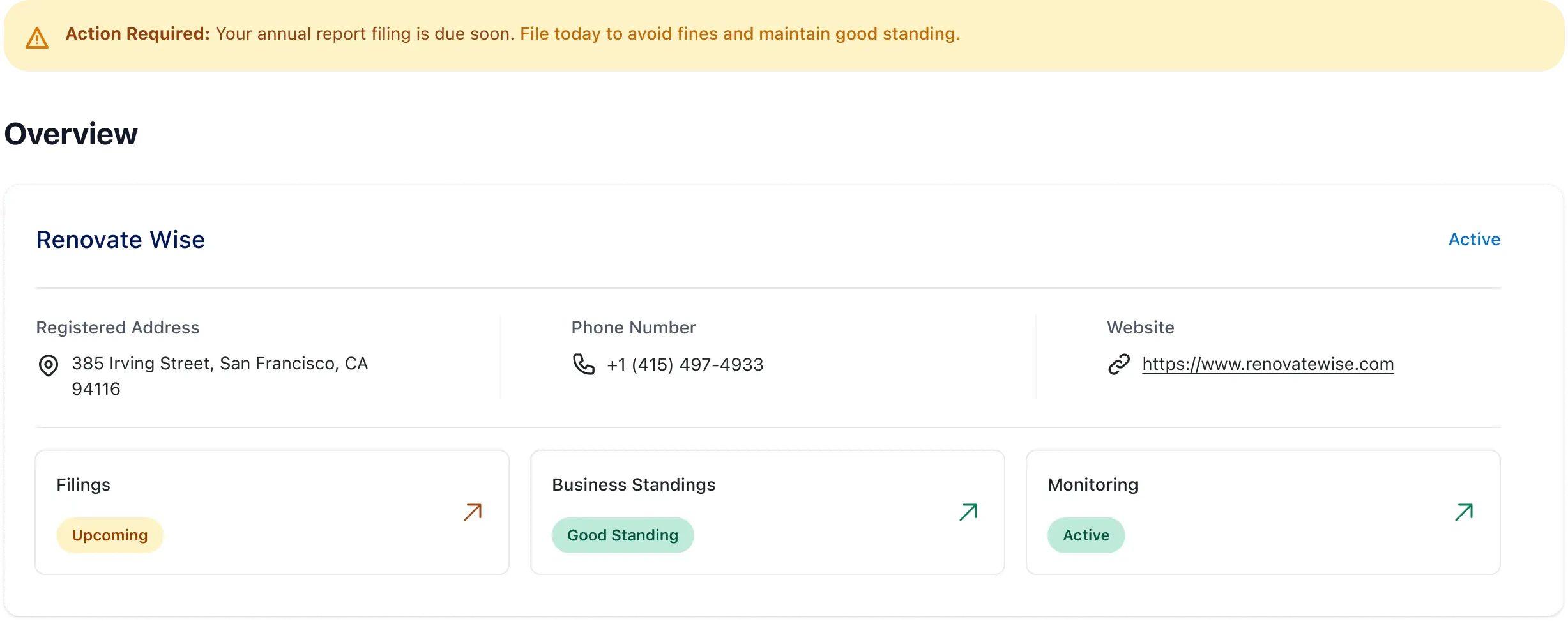
}
;
return inner;
};
Verification tells you a business is real and in good standing right now. Monitor tells you when that changes. Palm watches authoritative sources for registration changes, officer updates, address moves, and compliance deadlines - and sends you a webhook when something happens.
***
## Why monitoring
The industry default is scheduled re-verification — running the same check on every business in your portfolio annually or quarterly, regardless of whether anything changed. This is expensive and leaves blind spots. A business verified in January could dissolve in March, and you wouldn't know until the next scheduled check.
Monitor eliminates those blind spots. Instead of re-verifying on a schedule, you get notified when something actually changes — and only re-verify when the change warrants it. Palm watches authoritative sources continuously and pushes events to your webhook endpoint when it detects a change. No change, no noise.
When Monitor does detect a problem, you can act on it through Comply — file the overdue report, resolve the compliance gap — without leaving the API. Detection and resolution in one integration.
## What Monitor tracks
When you enroll a business in monitoring, Palm watches for changes across its registration data:
* **Registration status:** Active, suspended, dissolved, revoked. If a business falls out of good standing or gets administratively dissolved, you'll know immediately.
* **Legal name:** Name changes at the state level, including DBA updates.
* **Principal address:** When the address on file with the state changes.
* **Officers and directors:** Changes to the people listed on the state filing.
* **Registered Agent:** When the business changes its Registered Agent.
* **New filings:** Annual reports, amendments, and other documents filed with the state.
* **Compliance deadlines:** Upcoming filing due dates and overdue notices.
## How it works
Subscribe a verified business to monitoring. Palm begins watching its registration data.
When Palm detects a change, it sends a webhook event to your endpoint. Events include structured change data with the new values.
Use the event to update your records, alert your compliance team, file a compliance action through Comply, or — for structural changes like officer updates — re-verify to run Person Verification on new individuals.
## Event types
Monitor produces three event types, all delivered through [webhooks](/developer-guide/webhooks):
* **`business.registration.updated`:** Any registration data changed. This is the core monitoring event. The payload includes a `changes` array where each entry describes what changed, the previous value, the current value, and a human-readable summary. A single event can contain multiple changes (e.g., a name change and an address change filed together).
* **`business.filing.due`:** A compliance filing deadline is approaching. Includes the filing type, frequency, and due date. Use this to proactively remind your users or trigger compliance workflows before deadlines pass.
* **`business.filing.overdue`:** A compliance filing deadline has passed without a filing on record. A missed annual report can lead to suspension or administrative dissolution — this event lets you catch it early.
## Event payload reference
Registration change events include structured diffs so you can process them programmatically:
```json wrap JSON theme={null}
{
"id": "evt_1704538200000_h8i9j0k1l2m3",
"object": "event",
"type": "business.registration.updated",
"mode": "live",
"created_at": "2026-01-12T10:30:00Z",
"data": {
"business": {
"id": "987e6543-e21a-45b6-c789-012345678901",
"palm_id": "A1B2-C3D4-E5F6",
"legal_name": "NEW NAME LLC",
"registration_jurisdiction_id": "US-NC"
},
"changes": [
{
"attribute": "name.legal",
"action": "updated",
"summary": "Legal name changed from OLD NAME LLC to NEW NAME LLC",
"previous_value": "OLD NAME LLC",
"current_value": "NEW NAME LLC"
},
{
"attribute": "address.principal",
"action": "updated",
"summary": "Principal address updated",
"previous_value": {
"street_line_1": "123 OLD ST",
"city": "RALEIGH",
"region": "NC",
"postal_code": "27601"
},
"current_value": {
"street_line_1": "456 NEW ST",
"city": "CHARLOTTE",
"region": "NC",
"postal_code": "28202"
}
}
]
}
}
```
The `data.business` object is a lightweight reference — enough to identify which business changed. Use `GET /business/{id}` to retrieve the full record if needed.
Filing deadline events include the filing type and due date:
```json wrap JSON theme={null}
{
"id": "evt_1704538200000_l2m3n4o5p6q7",
"object": "event",
"type": "business.filing.due",
"mode": "live",
"created_at": "2026-02-26T12:00:00Z",
"data": {
"object": {
"type": {
"id": "annual_report",
"name": "Annual Report"
},
"frequency": "annual",
"due_date": "2026-04-15"
},
"business": {
"id": "987e6543-e21a-45b6-c789-012345678901",
"palm_id": "A1B2-C3D4-E5F6",
"legal_name": "ACME HOLDINGS LLC",
"registration_jurisdiction_id": "US-NC"
}
}
}
```
## When to use monitoring
* **Ongoing compliance obligations:** If you carry businesses on your platform and need to know when their compliance state changes, monitoring is cheaper and more reliable than any scheduled manual ops.
* **Lending and underwriting:** A business that dissolves or loses good standing after you've extended credit is a material risk. Monitoring catches these changes as they happen.
* **Insurance:** Policy binding depends on the business being active and in good standing. Monitor lets you catch status changes between renewal cycles.
* **Marketplace and platform trust:** If your platform lists or transacts with businesses, monitoring ensures you're not carrying dissolved or suspended entities.
## Prerequisites
* A Palm API key — [Get access](/get-started/get-access)
* A verified business — [Verify a business](/verify/verify-a-business)
* A webhook endpoint configured to receive events — [Webhooks](/developer-guide/webhooks)
## Subscribe to monitoring
After verifying a business, subscribe it to monitoring events:
```bash wrap Bash theme={null}
curl -X POST https://api.getpalm.com/v1/business/bus_4c7e1a.../subscription \
-H 'Content-Type: application/json' \
-H 'Authorization: Bearer sk_test_...' \
-d '{
"event_types": [
"business.registration.updated",
"business.filing.due",
"business.filing.overdue"
]
}'
```
## Managing a subscription
* **Check subscription status:** `GET /v1/business/{id}/subscription` returns the current monitoring state, including which event types are active.
* **Update event types:** `PATCH /v1/business/{id}/subscription` lets you change which monitoring events you receive for a specific business. For example, you might subscribe to registration changes but not filing deadlines.
* **Unsubscribe:** `DELETE /v1/business/{id}/subscription` stops monitoring for that business. You'll stop receiving events immediately.
For the full request/response schemas, see the [API Reference](/api-reference/introduction).
## How Monitor connects to Onboard, Verify, and Comply
Monitor sits between verification and action. Onboard finds the business. Verify gives you a point-in-time snapshot. Monitor keeps that snapshot current. Comply lets you act on what Monitor finds.
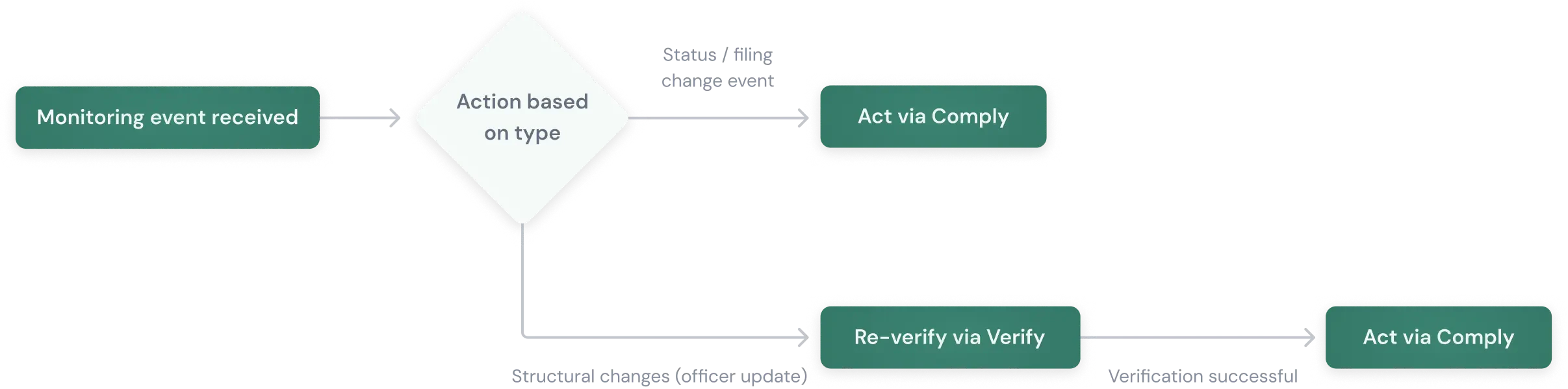
How you respond to a monitoring event depends on what changed:
**Status and filing events → Act directly:** When Monitor fires `business.filing.overdue` or a registration status changes to suspended, you already know what happened. Use Comply to file the annual report, alert your compliance team, or pause the account. No re-verification needed — the monitoring event gives you the answer.
**Structural changes → Re-verify, then act:** When Monitor reports an officer change, the event tells you who was added or removed — but it doesn't run Person Verification on the new individual. Re-verifying through Verify runs identity checks, watchlist screening, and risk assessment on the new officers. This is the scenario where re-verification adds a signal that monitoring alone won't provide.
Detection, verification, and resolution through the same API — one integration for the full lifecycle.