> ## Documentation Index
> Fetch the complete documentation index at: https://docs.getpalm.com/llms.txt
> Use this file to discover all available pages before exploring further.

# Onboard overview

> Find and onboard businesses into your platform.

export const iconProps = (variant = "default") => {
  const iconVariants = {
    default: "palm-icon-default",
    horizontal: "palm-icon-horizontal",
    stack: "palm-icon-stack",
    navigation: "palm-icon-navigation",
    darkHorizontal: "palm-icon-dark-horizontal",
    dark_stack: "palm-icon-dark-stack",
    getStarted: "palm-icon-get-started"
  };
  return iconVariants[variant] ?? iconVariants.default;
};

export const PalmCard = ({title, description, icon, variant = "default", href, items}) => {
  if (variant === "getStarted") {
    return <div data-card className="pc-wrapper-get-started flex flex-col gap-4 border border-[rgba(4,44,47,0.1)] rounded-2xl p-6">
        <div className="pc-wrapper-inner-get-started">
          {icon !== undefined && <div className="pc-icon-container-get-started">{icon}</div>}
          {title !== undefined && <span className="pc-title-get-started">{title}</span>}
        </div>
        {items && items.length > 0 && <ul className="pc-items-get-started">
            {items.map((item, i) => <li key={i}>
                <a href={item.href} className="pc-item-link-get-started">{item.label}</a>
              </li>)}
          </ul>}
      </div>;
  }
  const variants = {
    default: {
      wrapper: "pc-wrapper-default",
      title: "pc-title",
      description: "pc-description"
    },
    horizontal: {
      wrapper: "pc-wrapper-card",
      title: "pc-title-horizontal",
      description: "pc-description"
    },
    stack: {
      wrapper: "pc-wrapper-stack",
      title: "pc-title-stack",
      description: "pc-description"
    },
    darkHorizontal: {
      wrapper: "pc-wrapper-dark-horizontal",
      title: "pc-title-dark-horizontal",
      description: "pc-description-dark-horizontal"
    },
    navigation: {
      wrapper: "pc-wrapper-navigation",
      title: "pc-title-navigation",
      description: "pc-description-navigation"
    },
    dark_stack: {
      icon: "pc-icon-card",
      title: "pc-title",
      description: "pc-description"
    }
  };
  const styles = variants[variant] ?? variants.default;
  const inner = <a data-card href={href ? href : '#'} className={`no-underline flex flex-col h-full items-start gap-4 p-6 rounded-2xl hover:opacity-80 transition-opacity ${styles.wrapper}`}>
      {icon !== undefined && <span className="icon-wrapper">{icon}</span>}
      {(title !== undefined || description !== undefined) && <div className="flex flex-col min-w-0">
          {title !== undefined && <span className={styles.title}>{title}</span>}
          {description !== undefined && <span className={styles.description}>{description}</span>}
        </div>}
    </a>;
  return inner;
};

Onboard is where businesses enter your platform. Palm gives you access to 125M businesses through a single registry search - find the entity, pull structured registration data, and get them into the network so they're ready for verification and monitoring.

***

## What Onboard does

Onboard today gives you one core capability:

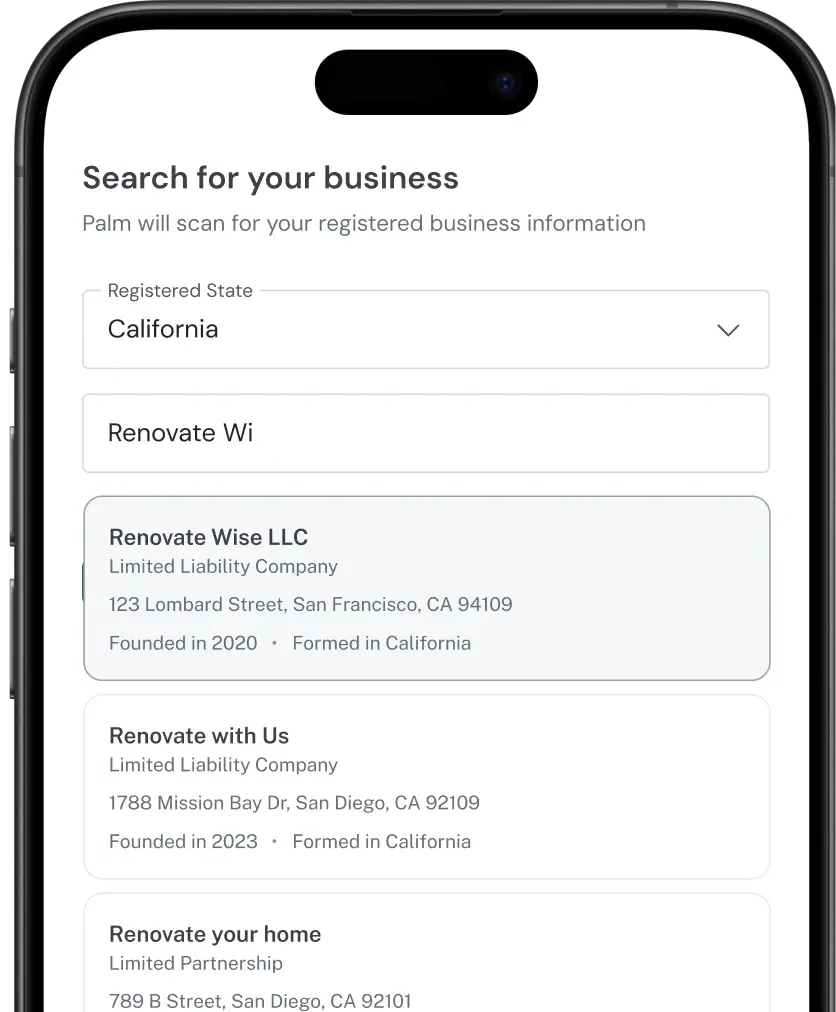
**Search the Registry** - Search 125M businesses in the network by name, jurisdiction, or location. Get back structured registration data from authoritative government sources - names, entity types, registration numbers, formation dates, jurisdictions, and principal addresses.

Palm aggregates registration data from every US Secretary of State office into a single searchable index. Instead of querying 50 individual state databases, you search once and get back normalized, structured results.

<div className="semitransparent-image-wrapper">
  <img src="https://mintcdn.com/palmfinance/1RPIbiD5PV2g0B_e/images/OnboardEyeCatch.webp?fit=max&auto=format&n=1RPIbiD5PV2g0B_e&q=85&s=302a1d45b54c4c8f7382d2853efb3005" alt="Image showcasing registry search with two results" style={{maxWidth: '418px', width: '100%', margin: '0', marginBottom: '-48px'}} width="836" height="1012" data-path="images/OnboardEyeCatch.webp" />
</div>

## When to use this

Use Onboard at the start of a business relationship. During onboarding, embed a registry search to find and pre-fill business data. When a business applies to your platform, search the registry to confirm it exists before sending it through verification.

Registry search is also useful for data enrichment - if you have a business name but need the address, entity type, or officer list, the registry has it.

## How it connects to Verify

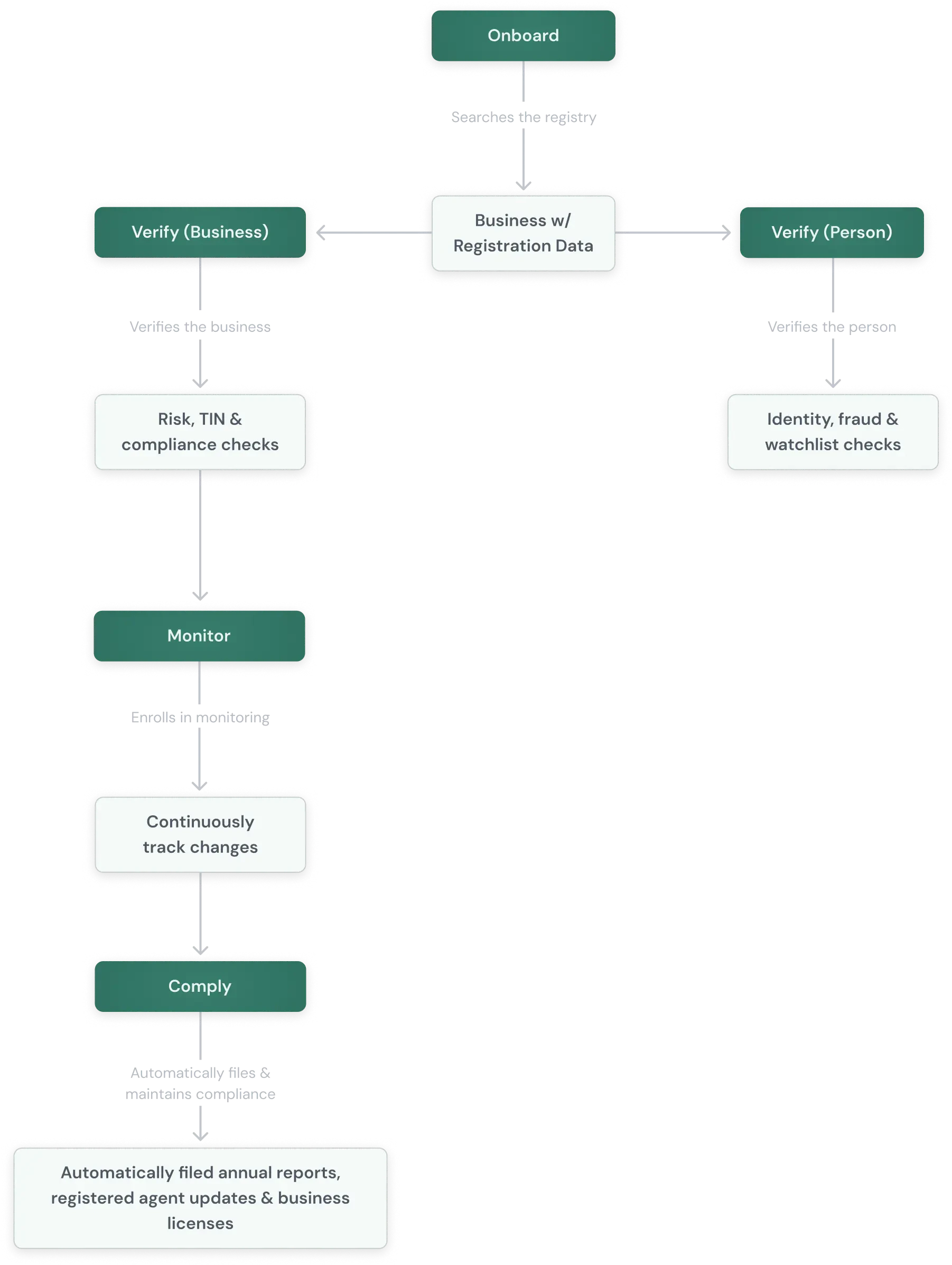
Onboard finds the business and pulls its public record. Verify runs the checks that public records don't cover - TIN validation, risk assessment, watchlist screening, and identity verification on associated people. A typical flow:

<div className="grid-image-wrapper">
  <img src="https://mintcdn.com/palmfinance/1RPIbiD5PV2g0B_e/images/GeneralPalmOutline.webp?fit=max&auto=format&n=1RPIbiD5PV2g0B_e&q=85&s=56b2ec60e41ae1af5d984b2d07ddfaa4" alt="Representation of how onboard falls within the Palm product suite." className="grid-image" width="1802" height="2394" data-path="images/GeneralPalmOutline.webp" />
</div>

## What you get back

A registry search returns matching business entities, each with detailed registration data. See the [API Reference](/api-reference/v1/registry/search-business-registries) for sample responses.

## Next steps
<div className="grid lg:grid-cols-2 gap-6 mt-6">
  <PalmCard variant="navigation" title="Search the Registry" description="Search all US registered businesses in the network by name, jurisdiction, or location." icon={<Icon className={iconProps("navigation")} icon="arrow-right" />} href="/onboard/registry-search" />

  <PalmCard variant="navigation" title="Verify overview" description="Verify businesses and people against authoritative sources. KYB, KYC, risk assessment, and ongoing re-verification." icon={<Icon className={iconProps("navigation")} icon="arrow-right" />} href="/verify/overview" />

  <PalmCard variant="navigation" title="Verify a business" description="Confirm that a business entity is real, registered, and in good standing." icon={<Icon className={iconProps("navigation")} icon="arrow-right" />} href="/verify/verify-a-business" />

  <PalmCard variant="navigation" title="Verify a person" description="Verify a person's identity with KYC checks, synthetic identity detection, and watchlist screening." icon={<Icon className={iconProps("navigation")} icon="arrow-right" />} href="/verify/verify-a-person" />
</div>