}
;
return inner;
};
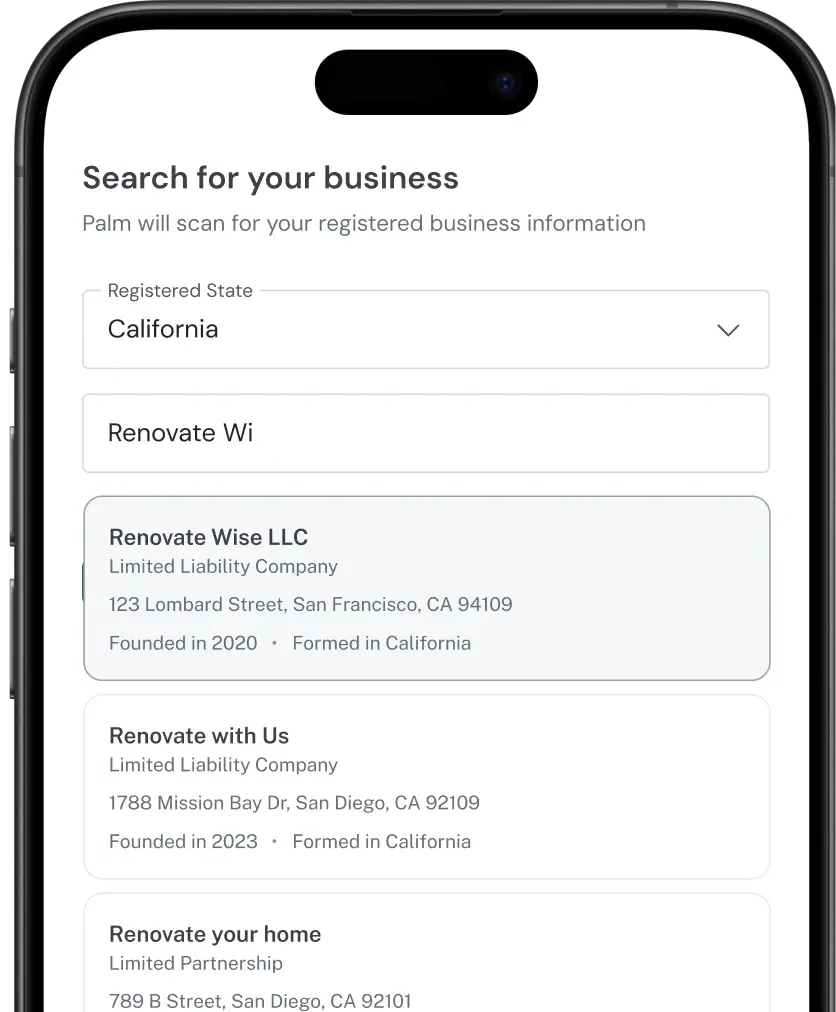
Registry Search lets you find business entities in business registries before you verify them. Search by name, EIN, jurisdiction, location, entity type, or any combination - and get back structured registration data from authoritative government sources.
***
## How the Registry works
Every business in the US is registered with at least one Secretary of State (SOS) office. When a business incorporates in Delaware or files an LLC in California, that state's SOS office creates a public record with the business's legal name, entity type, registration number, formation date, and current status. Palm aggregates these records from all 50 states into a single searchable Registry.
This means you can search once and get back the same data you'd find by visiting individual state SOS websites - but structured, normalized, and ready to use in your application.
## What you get back
A Registry Search returns a list of matching business entities, each with:
* **Palm ID**: A unique identifier assigned by Palm to track the business across the platform.
* **Registration data**: Legal name, entity type, registration number, formation date, formation and registration jurisdictions, and current status.
* **Principal address**: The business’s address on file with the registering authority.
## When to use this
Use Registry Search when you need to find a business before verifying it — during onboarding forms, search-ahead UIs, or pre-verification lookups. It’s also useful for enriching partial business data (e.g., you have a name but need the registration number or jurisdiction) or for checking name availability before registering a new entity.
## Quickstart
**Prerequisites**
* A Palm API key — [Get access](/get-started/get-access)
### Search by business name
Send a `POST` request to `/v1/business/registry/search` with your search criteria:
```bash wrap Bash theme={null}
curl -X POST https://api.getpalm.com/v1/business/registry/search \
-H 'Content-Type: application/json' \
-H 'Authorization: Bearer sk_test_...' \
-d '{
"name": "Acme Corporation",
"registration_jurisdiction": "US-CA"
}'
```
### Search parameters
All parameters are optional, but you must include at least the legal name. Combine parameters to narrow results. You can search by `name`, `ein`, `registration_jurisdiction`, `formation_jurisdiction`, `entity_type`, `status`, and `location` fields.
For the full parameter reference, see the [API Reference](/api-reference/introduction).
**Note:** Registration jurisdiction and formation jurisdiction are different concepts. A company might form in Delaware (formation jurisdiction) but register to do business in California (registration jurisdiction). If you're not sure which to use, `registration_jurisdiction` is the more common filter — it's where the business actually operates.
### Response
A successful search returns a list of matching business entities:
```json wrap JSON theme={null}
{
"object": "list",
"data": [
{
"palm_id": "1234-5678-9012",
"name": "Acme Corp",
"formation_date": "2020-03-15",
"formation_jurisdiction": "US-DE",
"registration_jurisdiction": "US-CA",
"status": "active",
"entity_type": "llc",
"registration_number": "202012345678",
"principal_address": {
"country": "US",
"street_line_1": "100 Main Street",
"street_line_2": "Suite 200",
"city": "San Francisco",
"region": "CA",
"postal_code": "94105"
}
}
]
}
```
### Understanding the response
The `status` field tells you whether the business is currently recognized by the state. An `active` status means the business has filed its required annual reports, paid its fees, and is authorized to do business. A business that falls behind on filings may show as `suspended` or `revoked` — it still exists, but it's not in good standing.
The `registration_number` is the identifier assigned by the state's SOS office. This number is unique within a jurisdiction but not across states — two different states could assign the same number to different businesses.
## Get a specific business registration
If you already have the jurisdiction and registration number, you can look up a specific business directly instead of searching:
```bash wrap Bash theme={null}
curl -X GET https://api.getpalm.com/v1/business/registry/US-CA/C1234567 \
-H 'Authorization: Bearer sk_test_...'
```
This returns a more detailed record than the search endpoint, including connected people and additional identifiers:
```json wrap JSON theme={null}
{
"palm_id": "1234-5678-9012",
"name": "Acme Corp",
"formation_date": "2020-03-15",
"formation_jurisdiction": "US-DE",
"registration_jurisdiction": "US-CA",
"status": "active",
"entity_type": "llc",
"registration_number": "202012345678",
"principal_address": {
"country": "US",
"street_line_1": "100 Main Street",
"street_line_2": "Suite 200",
"city": "San Francisco",
"region": "CA",
"postal_code": "94105"
},
"mailing_address": {
"country": "US",
"street_line_1": "100 Main Street",
"street_line_2": "Suite 200",
"city": "San Francisco",
"region": "CA",
"postal_code": "94105"
},
"standing": {
"registration": "compliant",
"tax": "compliant",
"agent": "compliant"
},
"fictitious_names": ["DBA Name LLC"],
"industry_codes": [
{
"code": "541511",
"type": "naics",
"description": "Custom Computer Programming Services"
}
],
"associates": [
{
"role": "agent",
"name": "John Smith",
"type": "person",
"title": "Registered Agent",
"address": {
"country": "US",
"street_line_1": "100 Main Street",
"street_line_2": "Suite 200",
"city": "San Francisco",
"region": "CA",
"postal_code": "94105"
}
},
{
"role": "member",
"name": "Jane Doe",
"type": "person",
"title": "Managing Member"
}
]
}
```
### Understanding the detail response
| Field | Description |
| ------------------------------------------------------------------------ | ------------------------------------------------------------------------------------------------------------------------------------------------------------------------------------------------------------------------------------------ |
| `palm_id` | Palm's unique identifier for this business. |
| `fictitious_names` | DBAs (Doing Business As) and trade names. A business can operate under names different from its legal name. Fictitious names are registered with the state so customers and regulators can trace the DBA back to the legal entity. |
| `industry_codes` | NAICS codes that classify the business's industry, when available. Not every business has a NAICS code on file. |
| `associates` | People and organizations connected to the business — officers, directors, owners, and Registered Agents. The Registered Agent is the entity authorized to receive legal documents on behalf of the business. Every business must have one. |
**Note:** Not all states report the same level of detail. Some states include officer names and Registered Agents in their public records; others don't. The detail endpoint returns whatever the state makes available.
## From search to verification
Registry Search confirms the business exists and pulls its public record from the state. Verification goes further - running risk assessment, TIN validation, watchlist screening, and other checks that public records don't cover. A typical flow:
* Searches the Registry to find the business
* Verifies the business to run identity, risk, and compliance checks beyond the public record
## Next steps