> ## Documentation Index
> Fetch the complete documentation index at: https://docs.getpalm.com/llms.txt
> Use this file to discover all available pages before exploring further.

# Verify overview

> Verify businesses and people against authoritative sources. KYB, KYC, risk assessment, and ongoing re-verification.

export const iconProps = (variant = "default") => {
  const iconVariants = {
    default: "palm-icon-default",
    horizontal: "palm-icon-horizontal",
    stack: "palm-icon-stack",
    navigation: "palm-icon-navigation",
    darkHorizontal: "palm-icon-dark-horizontal",
    dark_stack: "palm-icon-dark-stack",
    getStarted: "palm-icon-get-started"
  };
  return iconVariants[variant] ?? iconVariants.default;
};

export const PalmCard = ({title, description, icon, variant = "default", href, items}) => {
  if (variant === "getStarted") {
    return <div data-card className="pc-wrapper-get-started flex flex-col gap-4 border border-[rgba(4,44,47,0.1)] rounded-2xl p-6">
        <div className="pc-wrapper-inner-get-started">
          {icon !== undefined && <div className="pc-icon-container-get-started">{icon}</div>}
          {title !== undefined && <span className="pc-title-get-started">{title}</span>}
        </div>
        {items && items.length > 0 && <ul className="pc-items-get-started">
            {items.map((item, i) => <li key={i}>
                <a href={item.href} className="pc-item-link-get-started">{item.label}</a>
              </li>)}
          </ul>}
      </div>;
  }
  const variants = {
    default: {
      wrapper: "pc-wrapper-default",
      title: "pc-title",
      description: "pc-description"
    },
    horizontal: {
      wrapper: "pc-wrapper-card",
      title: "pc-title-horizontal",
      description: "pc-description"
    },
    stack: {
      wrapper: "pc-wrapper-stack",
      title: "pc-title-stack",
      description: "pc-description"
    },
    darkHorizontal: {
      wrapper: "pc-wrapper-dark-horizontal",
      title: "pc-title-dark-horizontal",
      description: "pc-description-dark-horizontal"
    },
    navigation: {
      wrapper: "pc-wrapper-navigation",
      title: "pc-title-navigation",
      description: "pc-description-navigation"
    },
    dark_stack: {
      icon: "pc-icon-card",
      title: "pc-title",
      description: "pc-description"
    }
  };
  const styles = variants[variant] ?? variants.default;
  const inner = <a data-card href={href ? href : '#'} className={`no-underline flex flex-col h-full items-start gap-4 p-6 rounded-2xl hover:opacity-80 transition-opacity ${styles.wrapper}`}>
      {icon !== undefined && <span className="icon-wrapper">{icon}</span>}
      {(title !== undefined || description !== undefined) && <div className="flex flex-col min-w-0">
          {title !== undefined && <span className={styles.title}>{title}</span>}
          {description !== undefined && <span className={styles.description}>{description}</span>}
        </div>}
    </a>;
  return inner;
};

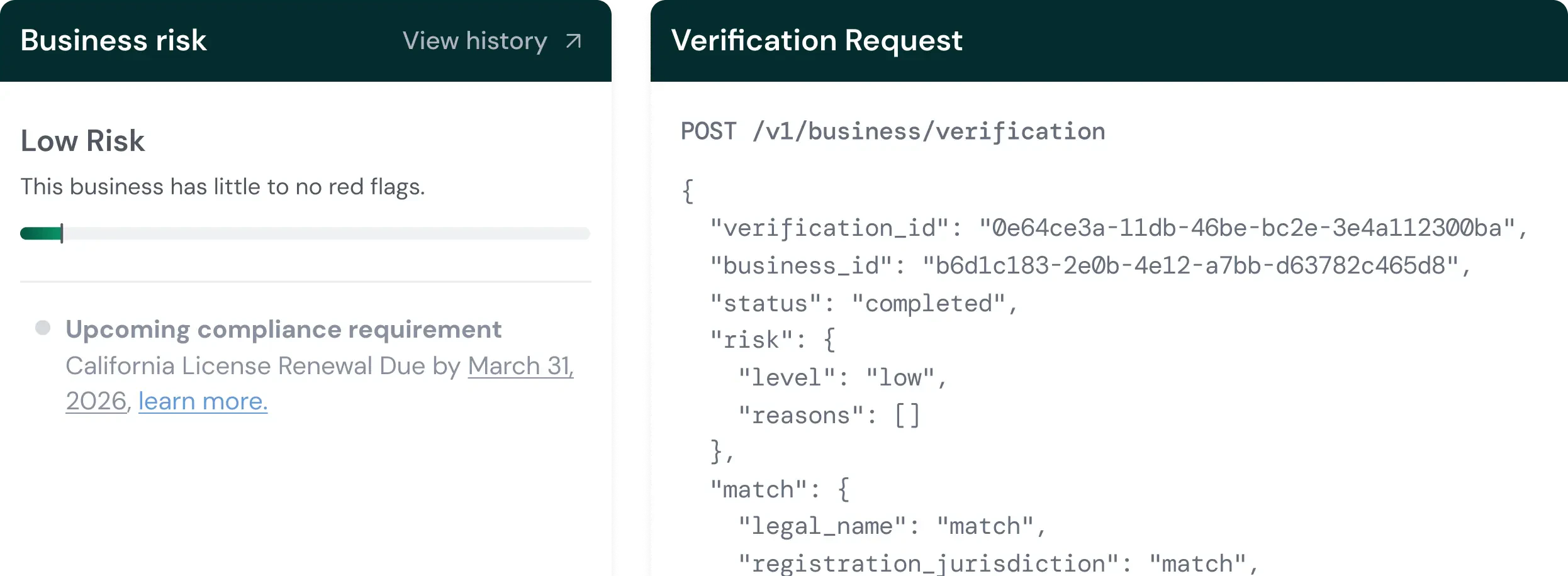
Verify is Palm's identity verification suite. It confirms that a business is real, registered, and in good standing — and that a person is who they claim to be. Palm verifies against authoritative sources and returns structured results: match data, risk assessment, and specific risk signals you can act on.

<div className="semitransparent-image-wrapper">
  <img src="https://mintcdn.com/palmfinance/1RPIbiD5PV2g0B_e/images/VerifyOverviewEyeCatch.webp?fit=max&auto=format&n=1RPIbiD5PV2g0B_e&q=85&s=4524037c835cc4ca9b7e3e9fbdfa7408" alt="Image showcasing a business risk score card, and the output of a verification request" style={{maxWidth: '1245px', width: '100%', margin: '0' }} width="2492" height="916" data-path="images/VerifyOverviewEyeCatch.webp" />
</div>

***

## What Verify does

* **Verify a Business (KYB):** KYB stands for Know Your Business. Palm confirms that a business entity is real, registered, and in good standing by verifying against state registries, the IRS, and licensing agencies. Optionally verify beneficial owners in the same call.
* **Verify a Person (KYC):** KYC stands for Know Your Customer. Palm confirms that a person is who they claim to be by verifying identity against authoritative sources, detecting synthetic (fabricated) identities, running velocity checks to catch fraud patterns, and screening against sanctions and watchlists.
* **Verify a TIN:** Validate a TIN (EIN or SSN) and name against IRS records as a standalone check, without running a full business or person verification.

## Verification is ongoing

Verification isn't just an onboarding step. Businesses change — ownership transfers, registrations lapse, compliance state shifts. Verify is designed for recurring use:

* **At onboarding:** Verify a business and its people when they first arrive on your platform.
* **On a schedule:** Re-verify annually, quarterly, or on whatever cadence your compliance requirements dictate.
* **When triggered:** Re-verify in response to a change event, such as an officer update or ownership transfer detected through Monitor.

Re-verification pulls from the latest data from your vault. One API call with just the business ID and workflow key.

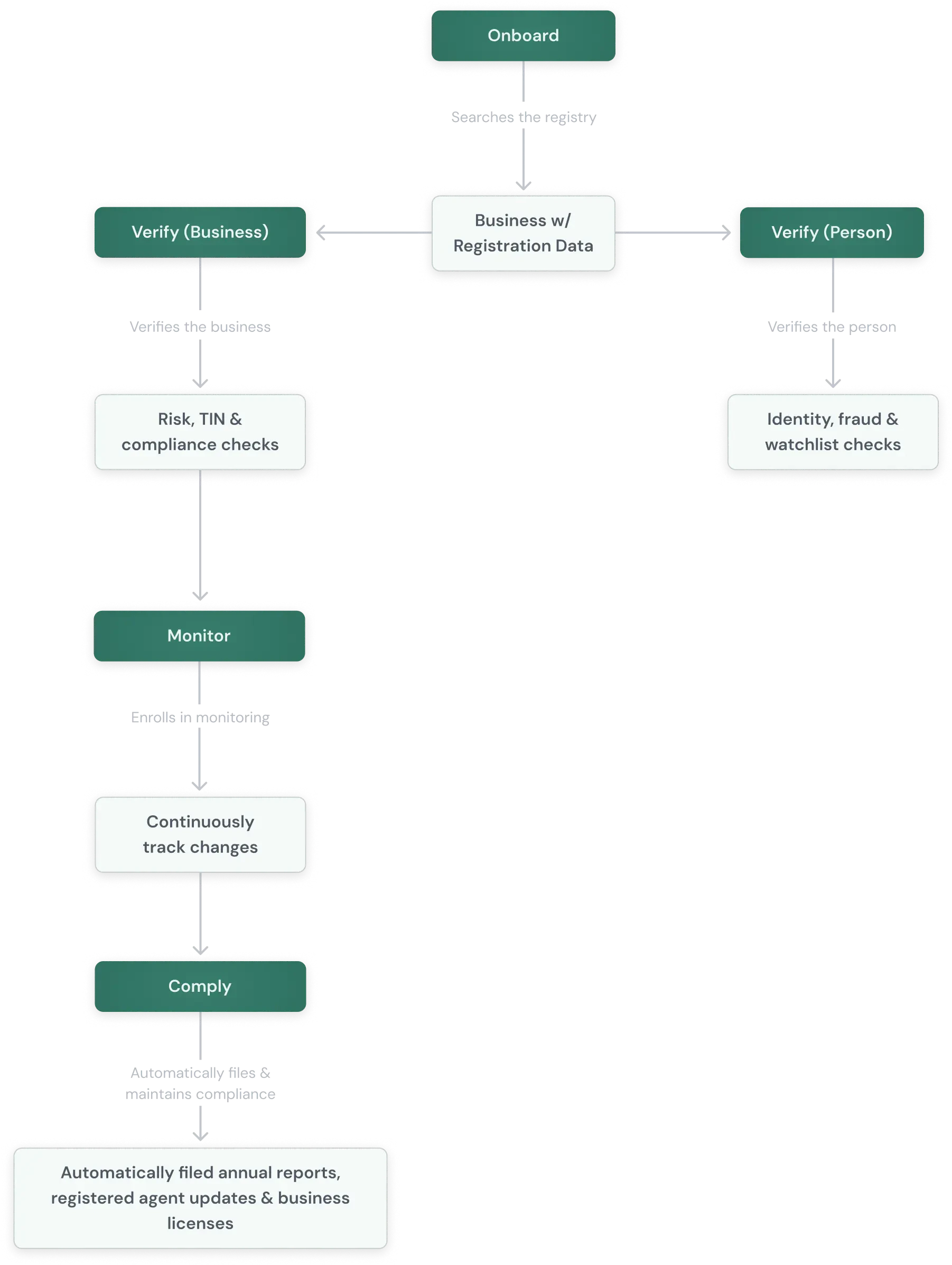
## How it connects to Onboard

Onboard is where you find businesses and pull their public record. Verify runs the checks that go beyond the public record - TIN validation, risk assessment, watchlist screening, and identity verification on associated people. A typical flow:

<div className="grid-image-wrapper">
  <img src="https://mintcdn.com/palmfinance/1RPIbiD5PV2g0B_e/images/GeneralPalmOutline.webp?fit=max&auto=format&n=1RPIbiD5PV2g0B_e&q=85&s=56b2ec60e41ae1af5d984b2d07ddfaa4" alt="Representation of how verify falls within the Palm product suite." className="grid-image" width="1802" height="2394" data-path="images/GeneralPalmOutline.webp" />
</div>

Not every integration uses every step. You can use any combination of products depending on your needs. They work together but operate independently.

## From search to verification

Every verification returns:

* **Match results:** How each submitted field compares against authoritative records (`match`, `no_match`, `partial_match`, or `not_checked`).
* **Risk assessment:** A risk level (`low`, `medium`, `high`, or `critical`) with specific risk signals that explain the assessment.
* **Verification status:** `pending`, `in_progress`, `completed`, or `failed`.

KYC adds synthetic identity detection, velocity checks, and watchlist screening. KYB adds associate (beneficial owner) verification results. For the full breakdown of risk levels, risk signals, and match result types, see [Verification Reference](/verify/verification-reference).

## Next steps
<div className="grid lg:grid-cols-2 gap-6 mt-6">
  <PalmCard variant="navigation" title="Verify a business" description="Confirm that a business entity is real, registered, and in good standing." icon={<Icon className={iconProps("navigation")} icon="arrow-right" />} href="/verify/verify-a-business" />

  <PalmCard variant="navigation" title="Verify a person" description="Verify a person's identity with KYC checks, synthetic identity detection, and watchlist screening." icon={<Icon className={iconProps("navigation")} icon="arrow-right" />} href="/verify/verify-a-person" />

  <PalmCard variant="navigation" title="Verification reference" description="Risk levels, risk signals, match results, and verification lifecycle details." icon={<Icon className={iconProps("navigation")} icon="arrow-right" />} href="/verify/verification-reference" />

  <PalmCard variant="navigation" title="Onboard overview" description="Find and onboard businesses into your platform." icon={<Icon className={iconProps("navigation")} icon="arrow-right" />} href="/onboard/overview" />
</div>