}
;
return inner;
};
This page covers the shared concepts across all Palm verifications - risk levels, risk signals, match result types, and verification lifecycle. For quickstart guides and API examples, see [Verify a Business](/verify/verify-a-business) and [Verify a Person](/verify/verify-a-person).
***
## Verification lifecycle
Every verification moves through these statuses:
| Status | Description |
| ------------------------------------------------------------ | ------------------------------------------------------------------------------------------------------------------------------------------------------------------------------------- |
| `pending` | Verification created but not yet started. |
| `in_progress` | Currently being processed. Most verifications complete in seconds. Cases that require enhanced due diligence are reviewed by our verification team. |
| `completed` | Finished with results — check `risk.level` and `match` for details. A `completed` status does not mean the person or business "passed" — it means Palm has results for you to act on. |
| `failed` | System error (provider unavailable, configuration issue). This is not a verification failure — it means something went wrong technically. Retry the request. |
The flow: submit verification request, data validated against workflow requirements, entity/entities created and data stored in the vault, request sent, results returned with verification ID.
## Risk levels
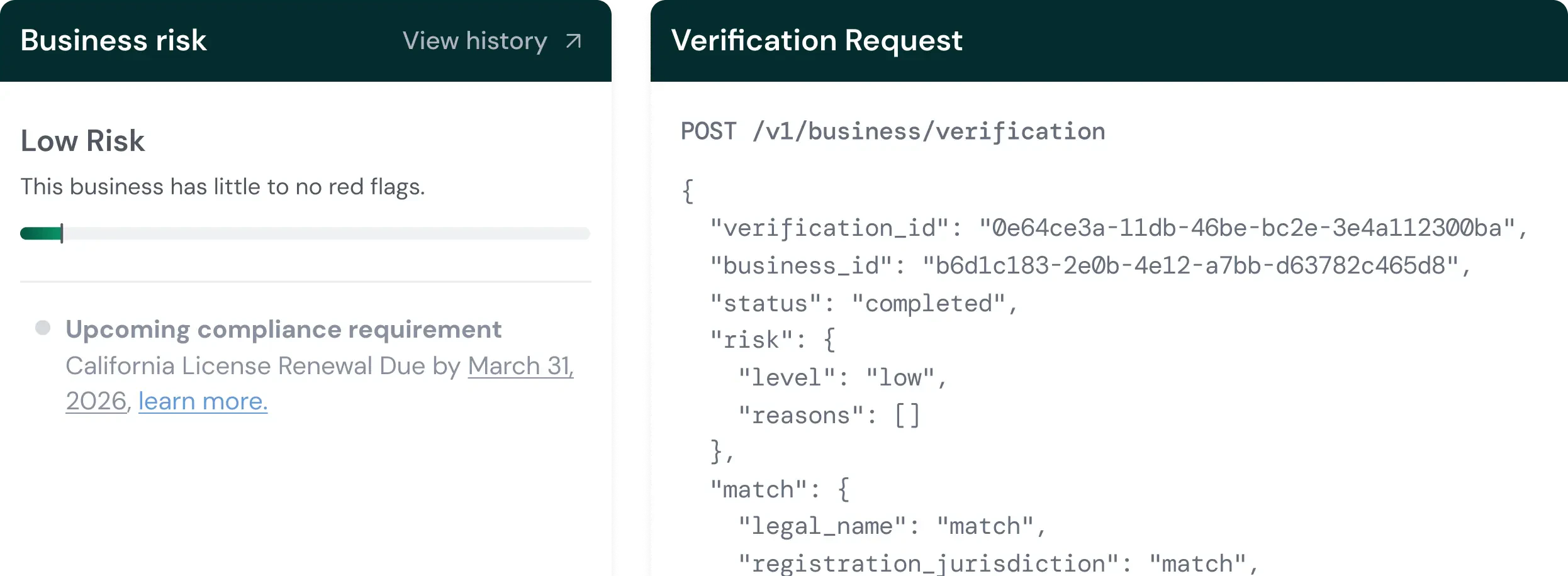
Every completed verification returns a risk level. This is Palm's overall assessment based on all signals combined.
| Level | What it means | Typical action |
| --------------------------------------------------------- | ------------------------------------------------------------------------------------------------------------------------------------------------------------------- | --------------------------------------------------------------------------------------------------------------------------------------------------------- |
| `low` | No significant concerns detected. Identity data matches authoritative records, no watchlist hits, no fraud signals. | Approve. This is the happy path. |
| `medium` | Minor concerns that warrant attention. Could be a partial name mismatch, a single CIP field that didn't match, or a low-confidence PEP hit. | Review recommended. In many cases these resolve to false positives — a name formatting difference, a recent address change. But they should be looked at. |
| `high` | Serious concerns that require human review before proceeding. Triggers include confirmed synthetic identity flags, multiple field mismatches, or sanctions matches. | Manual review required. Do not auto-approve `high` risk verifications without human review. |
| `critical` | Severe issues. The fraud score is in the highest tier, there are multiple compounding risk signals, or there's a confirmed sanctions match with high confidence. | Likely rejection. Critical risk almost always means the identity or business should not be onboarded without extraordinary justification. |
## Risk signals
Risk signals are the specific indicators that drove the risk assessment. The `risk.reasons` array in the response contains the signals that contributed to the risk level. Examining individual signals — not just the overall level — is how you make informed decisions about borderline cases.
### Identity risks
| Signal | What it means | Typical action |
| -------------------------------------------------------------------------- | ------------------------------------------------------------------------------------------------------------------------------------------------------------------------------------------------------- | ------------------------------------------------------------------------------------------------------------------------------------------------------------------------------------------------------ |
| `watchlist_match` | A match was found on a sanctions or watchlist database. This is a general signal — check the `watchlist` object in the response for the specific list and confidence score. | Review the watchlist match details. Potential matches (low confidence) may be false positives due to common names. Confirmed matches require compliance team review. |
| `sanctions_match` | OFAC SDN list or international sanctions match. This is the most serious identity signal — transacting with a sanctioned individual can carry severe legal penalties. | Escalate to compliance immediately. Do not proceed with onboarding until the match is reviewed and resolved. |
| `pep_match` | Person identified as a Politically Exposed Person — someone who holds or recently held a prominent public function (elected officials, senior government employees, military leaders, judiciary). | PEP status alone isn't disqualifying. It means enhanced due diligence is required. Understand the person's role and assess whether the business relationship makes sense in context. |
| `adverse_media` | Negative news coverage found related to the person — typically involving financial crime, fraud, regulatory action, or legal proceedings. | Review the specific media coverage. Adverse media is a contextual signal, not a definitive one. A news article about a dismissed lawsuit is different from coverage of an ongoing fraud investigation. |
| `duplicate_identity` | The submitted identity matches another person already verified in your system. Same SSN, same DOB, but different name or other details. | Investigate whether this is a data entry error, a legitimate name change, or potential identity theft. |
| `identity_theft_indicators` | The identity attributes show patterns consistent with stolen identity use — for example, the SSN belongs to a deceased person, or the identity shows signs of being used without the owner's knowledge. | High-priority review. Identity theft indicators require careful handling because there's a real victim involved. |
## Match results
Match results indicate how well submitted data aligns with authoritative sources. Every verified field returns one of these values:
| Result | What it means |
| -------------------------------------------------------------- | -------------------------------------------------------------------------------------------------------------------------------------------------------------------------------------------------------------------------------------------------------------------- |
| `match` | The submitted value matches authoritative records. For names, this means an exact match. For addresses, minor formatting differences (e.g., "St" vs "Street") are normalized before comparison. |
| `no_match` | The submitted value doesn't match what's on file. This is a negative signal, but severity depends on the field. An address `no_match` (people move) is less concerning than an SSN `no_match` (SSNs don't change). |
| `partial_match` | The submitted value is close but not exact. Common causes: name variations ("Bob" vs "Robert"), hyphenated last names, address formatting differences, or minor typos. A `partial_match` is not a failure — it's a signal that something is close but not identical. |
| `not_checked` | The field was not checked against authoritative sources. This typically means the provider doesn't have data for this field, or the field wasn't required by your workflow. |
Only fields included in the verification request appear in match results.
## Vault storage
Palm stores all submitted data in an encrypted vault at the time of verification. When you re-verify a person or business, Palm pulls from the vault.
## Workflows
Every verification request includes a `workflow_key`. The workflow controls what happens when Palm processes a verification — which checks run, what fields are required, and how risk is assessed.
### What a workflow configures
A workflow defines a sequence of automated checks. Depending on your configuration, a single verification request can trigger any combination of:
| Check | What it does |
| --------------------- | ------------------------------------------------------------ |
| Identity verification | KYC/KYB against authoritative sources. |
| TIN verification | EIN or SSN validated against IRS records. |
| Risk assessment | Evaluates risk signals and calculates an overall risk level. |
### Execution mode
Workflows run in `headless` mode — the API call executes all checks and returns results synchronously. No user interaction required. You submit the verification request, Palm runs the configured checks, and you get results back in one response.
### How to get a workflow key
Palm configures workflows based on your compliance requirements. During onboarding, we'll set up one or more workflows tailored to your use case — the checks you need, the fields you require, and the risk thresholds that match your program. You'll receive a `workflow_key` for each configuration.
If your requirements change (e.g., you need to adjust required fields), reach out and we'll update your workflow configuration.
A self-service workflow configurator is available in Palm Console (beta). [Contact us](mailto:support@getpalm.com) for access.
## Webhooks
Verification completion fires webhook events:
| Event | Description |
| -------------------------------------------------------------------------------- | -------------------------- |
| `user.verification.completed` | KYC verification finished. |
| `business.verification.completed` | KYB verification finished. |
Webhook payloads include the verification ID, risk level, and summary match results. Subscribe to webhooks for async notification rather than polling. See [Webhooks](/developer-guide/webhooks).
## Best practices
* **Handle all risk levels:** Implement logic for `low`, `medium`, `high`, and `critical` outcomes. Don't just handle the happy path.
* **Use risk signals:** Examine individual signals in `risk.reasons`, not just the overall risk level. Two verifications can both be `medium` risk for very different reasons — a PEP match requires different handling than a data mismatch.
* **Verify associated people:** For businesses, verify owners with significant ownership by including them as associates. Regulatory frameworks typically require verification of anyone with 25%+ ownership or significant control.
* **Subscribe to webhooks:** Use async notification rather than polling for verification completion.
* **Log verification IDs:** Store verification IDs for audit trail and support. You'll need them for compliance reporting and dispute resolution.
* **Review match results:** Use field-level match data to understand verification confidence. A verification with `low` risk but several `partial_match` results is less confident than one with all `match` results.
## Next steps