> ## Documentation Index
> Fetch the complete documentation index at: https://docs.getpalm.com/llms.txt
> Use this file to discover all available pages before exploring further.
# Verify a TIN
> Validate a Tax Identification Number against IRS records — standalone, without a full business or person verification.
export const iconProps = (variant = "default") => {
const iconVariants = {
default: "palm-icon-default",
horizontal: "palm-icon-horizontal",
stack: "palm-icon-stack",
navigation: "palm-icon-navigation",
darkHorizontal: "palm-icon-dark-horizontal",
dark_stack: "palm-icon-dark-stack",
getStarted: "palm-icon-get-started"
};
return iconVariants[variant] ?? iconVariants.default;
};
export const PalmCard = ({title, description, icon, variant = "default", href, items}) => {
if (variant === "getStarted") {
return
***
## What it does
Verify TIN checks whether a TIN (EIN or SSN) matches the name on file at the IRS. It returns one of three results: matched, not matched, or pending (IRS unavailable).
This is a single-purpose check. It does not run registry lookups, risk assessment, or any other verification step. If you need the full suite of business verification checks, use [Verify a Business](/verify/verify-a-business) — which includes TIN verification as part of the workflow.
## When to use it
Use the standalone TIN endpoint when you need to validate a TIN outside of a full verification flow:
* **1099 processing:** Confirm TINs before filing to avoid IRS B-notices.
* **Pre-verification validation:** Check a TIN before running a full business verification.
* **Bulk TIN hygiene:** Validate TINs across your existing portfolio.
* **SSN verification:** Validate an individual's SSN and name against IRS records, independent of a person verification.
## Request
`POST /v1/tin/verification`
| Field | Type | Required | Description |
| ------------------------------------------------------------- | ------ | -------- | -------------------------------------------------------------------------------------- |
| `tin` | string | Yes | EIN (`XX-XXXXXXX` or 9 digits) or SSN (`XXX-XX-XXXX` or 9 digits) |
| `name` | string | Yes | For EIN: legal business name. For SSN: full name (`First Last` or `First Middle Last`) |
| `tin_type` | enum | Yes | `ein` or `ssn` — determines the validation path |
| `reference_id` | string | No | Your reference ID, echoed back in the response |
| `metadata` | object | No | Free-form key/value pairs stored on the verification record |
#### Example request
```bash wrap Bash theme={null}
curl -X POST https://api.getpalm.com/v1/tin/verification \
-H 'Content-Type: application/json' \
-H 'Authorization: Bearer sk_test_...' \
-d '{
"tin": "12-3456789",
"tin_type": "ein",
"name": "Acme Corporation",
"reference_id": "tin_req_12345"
}'
```
## Response
| Field | Type | Description |
| ------------------------------------------------------------------- | --------------- | --------------------------------------------------------------------- |
| `verification_id` | string (UUID) | Unique identifier for this TIN verification. |
| `object` | string | Always `tin_verification`. |
| `tin_type` | enum | `ein` or `ssn` (echoes the request). |
| `matched` | boolean or null | `true` = match, `false` = no match, `null` = could not be determined. |
| `status` | enum | `completed`, `pending`, `in_progress`, or `failed`. |
| `unavailable_reason` | enum | Only present when `status` is `pending`. See below. |
| `reference_id` | string | Echoed from request, if provided. |
| `verified_at` | datetime | When the TIN was verified. Only present when `status` is `completed`. |
### Response states
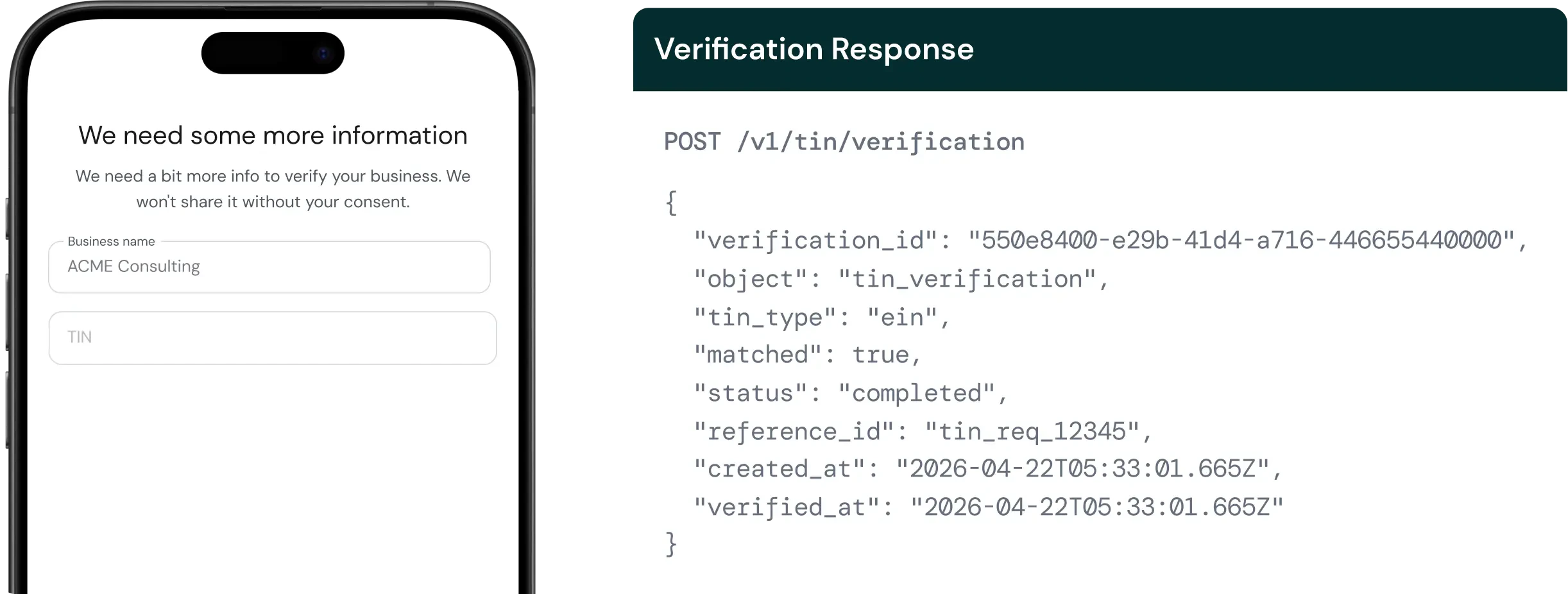
**Completed:** The IRS returned a definitive answer. Check `matched` for the result.
```json wrap JSON theme={null}
{
"verification_id": "550e8400-e29b-41d4-a716-446655440000",
"object": "tin_verification",
"tin_type": "ein",
"matched": true,
"status": "completed",
"reference_id": "tin_req_12345",
"created_at": "2026-04-22T05:33:01.665Z",
"verified_at": "2026-04-22T05:33:01.665Z"
}
```
**Pending:** The IRS TIN matching service is temporarily unavailable. `matched` is `null`. Check `unavailable_reason` and retry later.
```json wrap JSON theme={null}
{
"verification_id": "550e8400-e29b-41d4-a716-446655440000",
"object": "tin_verification",
"tin_type": "ein",
"matched": null,
"status": "pending",
"unavailable_reason": "tin_matching_service_unavailable",
"reference_id": "tin_req_12345",
"created_at": "2026-04-22T05:33:01.665Z"
}
```
### Unavailable reasons
| Reason | What it means |
| --------------------------------------------------------------------------------- | ---------------------------------------------------------- |
| `tin_matching_service_unavailable` | IRS TIN matching service is temporarily down. Retry later. |
| `tin_matching_token_unavailable` | Authentication with IRS service failed. Retry later. |
### Error codes
| Reason | What it means |
| ---------------------------------------------------------------------------- | ---------------------------------------------------------------- |
| `tin_matching_not_configured` | TIN matching is not enabled for your account. Contact Palm. |
| `tin_matching_invalid_format` | The TIN format was rejected by the IRS service. Check the input. |
| `tin_matching_unknown_error` | Unexpected error. Retry, and contact Palm if it persists. |
## Handling IRS downtime
The IRS TIN matching service has scheduled and unscheduled downtime. When the service is unavailable, the endpoint returns `status: pending` with `matched: null` instead of failing. This lets you distinguish between "TIN didn't match" (`matched: false`) and "we couldn't check" (`matched: null`).
Build your integration to handle the pending state: store the `verification_id`, and retry when your system is ready. Do not treat `matched: null` as a match or a non-match.
## Verify TIN vs full business verification
| | Verify TIN | Verify a Business |
| --------------------- | ---------------------------- | ----------------------------------------- |
| Endpoint | `POST /v1/tin/verification` | `POST /v1/business/verification` |
| What it checks | TIN + name against IRS only. | Registry, TIN, risk, watchlists and more. |
| Requires workflow | No. | Yes (`workflow_key`). |
| Requires vault record | No. | Yes (business must exist in vault). |
| Use case | Standalone TIN validation. | Full KYB verification. |
For the full parameter reference, see the [API Reference](/api-reference/introduction).
## Next steps