
Why monitoring
The industry default is scheduled re-verification — running the same check on every business in your portfolio annually or quarterly, regardless of whether anything changed. This is expensive and leaves blind spots. A business verified in January could dissolve in March, and you wouldn’t know until the next scheduled check. Monitor eliminates those blind spots. Instead of re-verifying on a schedule, you get notified when something actually changes — and only re-verify when the change warrants it. Palm watches authoritative sources continuously and pushes events to your webhook endpoint when it detects a change. No change, no noise. When Monitor does detect a problem, you can act on it through Comply — file the overdue report, resolve the compliance gap — without leaving the API. Detection and resolution in one integration.What Monitor tracks
When you enroll a business in monitoring, Palm watches for changes across its registration data:- Registration status: Active, suspended, dissolved, revoked. If a business falls out of good standing or gets administratively dissolved, you’ll know immediately.
- Legal name: Name changes at the state level, including DBA updates.
- Principal address: When the address on file with the state changes.
- Officers and directors: Changes to the people listed on the state filing.
- Registered Agent: When the business changes its Registered Agent.
- New filings: Annual reports, amendments, and other documents filed with the state.
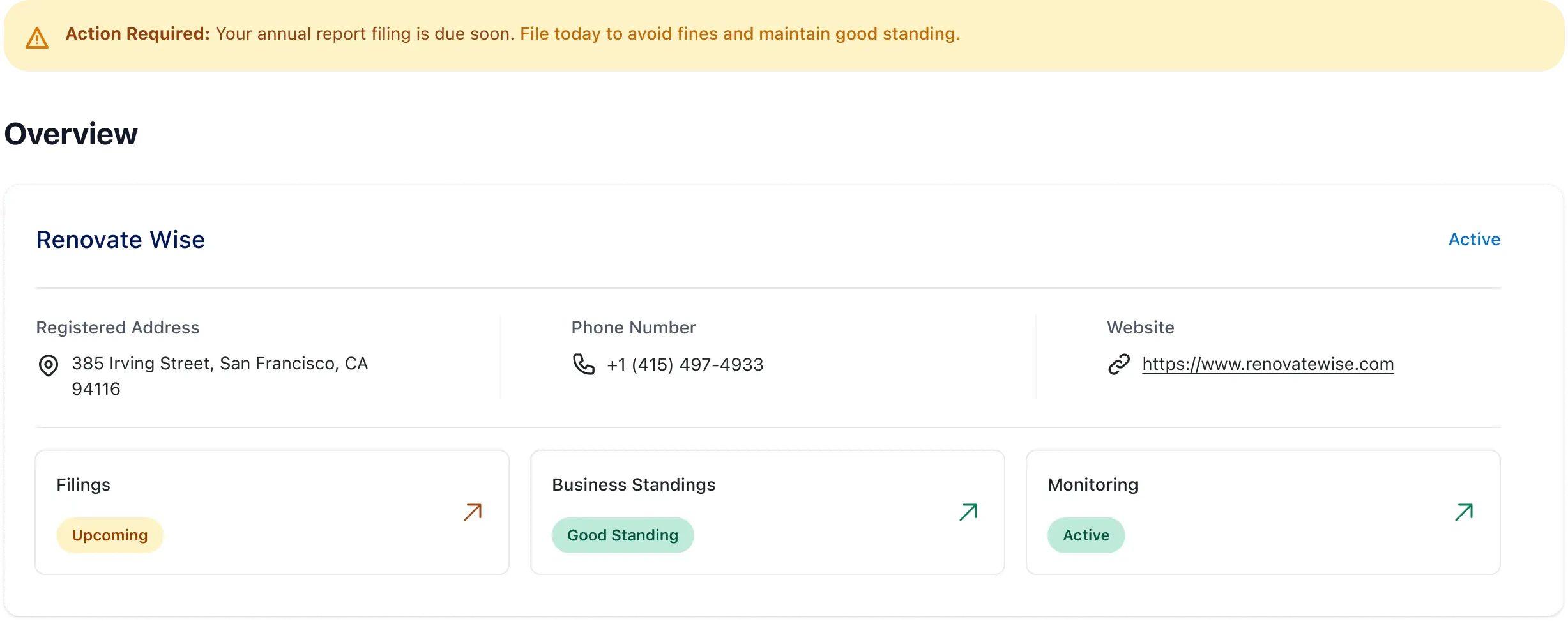
- Compliance deadlines: Upcoming filing due dates and overdue notices.
How it works
1
Start monitoring
Identify the business you want to watch by Palm ID, by registration jurisdiction and number, or by a business already in your portfolio. Palm begins watching its registration data.
2
Receive events
When Palm detects a change, it sends a webhook event to your endpoint. Events include structured change data with the new values.
3
Act
Use the event to update your records, alert your compliance team, file a compliance action through Comply, or — for structural changes like officer updates — re-verify to run Person Verification on new individuals.
Event types
Monitor produces three event types, all delivered through webhooks:business.registration.updated: Any registration data changed. This is the core monitoring event. The payload includes achangesarray where each entry describes what changed, the previous value, the current value, and a human-readable summary. A single event can contain multiple changes (e.g., a name change and an address change filed together).business.filing.due: A compliance filing deadline is approaching. Includes the filing type, frequency, and due date. Use this to proactively remind your users or trigger compliance workflows before deadlines pass.business.filing.overdue: A compliance filing deadline has passed without a filing on record. A missed annual report can lead to suspension or administrative dissolution — this event lets you catch it early.
Event payloads
Registration change events carry achanges array with one entry per attribute that changed, each giving the previous value, the current value, and a human-readable summary. A single event can carry several changes when they were filed together: a name change and an address change submitted at the same time arrive as one event. Filing deadline events carry the filing type, frequency, and due date.
In both, data.business identifies which business changed. It is not the full record, so retrieve the business when you need more.
For the payload of every monitoring event, see Webhook example payloads.
When to use monitoring
- Ongoing compliance obligations: If you carry businesses on your platform and need to know when their compliance state changes, monitoring is cheaper and more reliable than any scheduled manual ops.
- Lending and underwriting: A business that dissolves or loses good standing after you’ve extended credit is a material risk. Monitoring catches these changes as they happen.
- Insurance: Policy binding depends on the business being active and in good standing. Monitor lets you catch status changes between renewal cycles.
- Marketplace and platform trust: If your platform lists or transacts with businesses, monitoring ensures you’re not carrying dissolved or suspended entities.
Prerequisites
- A Palm API key — Get access
- A webhook endpoint configured to receive events — Webhooks
Start monitoring
There are two ways to switch monitoring on. Which one you use depends on whether you already hold the business in your portfolio. Monitor a business (POST /v1/business/subscription) identifies the registration directly, with no portfolio business required. Palm resolves the identifier, creates the portfolio business, and returns it with the subscription. See Monitor business.
Monitor a portfolio business (POST /v1/business/{business_id}/subscription) takes a business you already hold, for example one you have verified. The body carries the event types and nothing else. See Monitor portfolio business.
Identify the business
Send exactly one identifier: eitherpalm_id, as returned by registry search, or registration_jurisdiction and registration_number together. Any other combination returns 400, and nothing is created.
Monitoring is per registration
Each identifier names a registration, not a company. A business registered in several states has a separate registry record in each one, each with its own Palm ID. A Delaware company qualified into Michigan and Connecticut has three. Subscribe once for each registration you want to watch. The subscriptions are independent. Every record carries both the jurisdiction it is registered in and the jurisdiction it was formed in, and the two differ when a business has expanded beyond its home state.When the identifier does not resolve
An identifier that does not match exactly one registration is rejected, and no subscription is created.404No registration matches the identifier. The response names what was searched. Check the registration number and jurisdiction, then retry.422More than one registration matches. A registration number can appear against more than one record. The response lists thecandidates, each with itspalm_id, name, registration jurisdiction, and formation jurisdiction. Resubmit with thepalm_idyou want.
422. Contact Palm if you receive this; changing the request will not resolve it.
The portfolio business Palm creates
When you monitor by identifier, Palm creates the portfolio business, links it to the resolved registry record, and returns it. From there it behaves like any business you added yourself: you read, change, and cancel the subscription the same way, receive the same alerts, and see the business in your portfolio.- Filled in from the registry record: legal name, entity type, formation date, formation and registration jurisdiction, and principal address. The registration number is stored in the business metadata.
- Reused, not duplicated: if your organization already holds a portfolio business for that registry record, Palm reuses it instead of creating a second one, so you do not receive duplicate alerts. Businesses pointing at different registrations of the same company are kept separate.
Managing a subscription
- Check subscription status:
GET /v1/business/{business_id}/subscriptionreturns the current monitoring state, including which event types are active. - Update event types:
PATCH /v1/business/{business_id}/subscriptionlets you change which monitoring events you receive for a specific business. For example, you might subscribe to registration changes but not filing deadlines. - Unsubscribe:
DELETE /v1/business/{business_id}/subscriptionstops monitoring for that business. You’ll stop receiving events immediately.
How Monitor connects to Onboard, Verify, and Comply
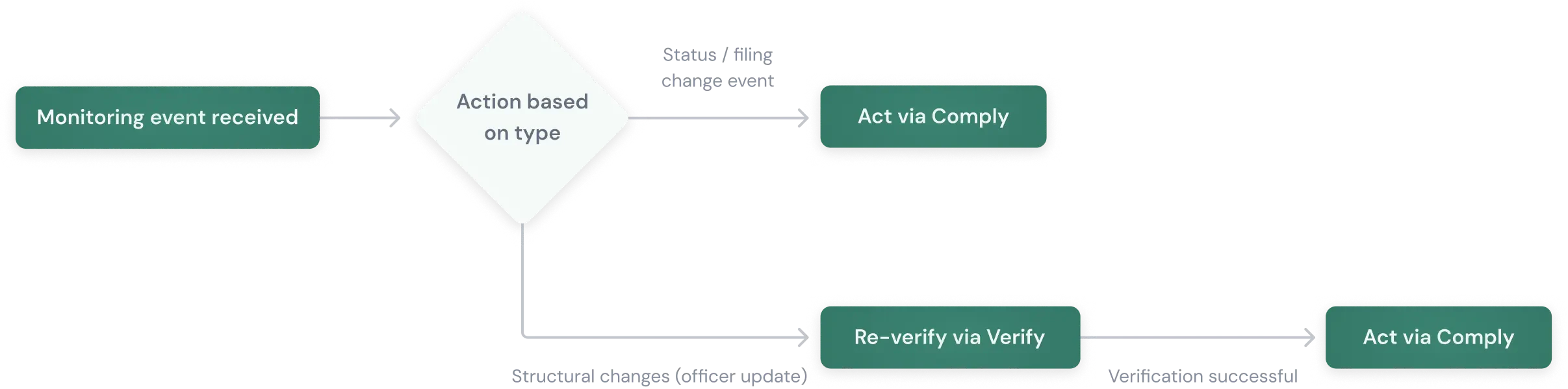
Monitor sits between verification and action. Onboard finds the business. Verify gives you a point-in-time snapshot. Monitor keeps that snapshot current. Comply lets you act on what Monitor finds. How you respond to a monitoring event depends on what changed: Status and filing events → Act directly: When Monitor firesbusiness.filing.overdue or a registration status changes to suspended, you already know what happened. Use Comply to file the annual report, alert your compliance team, or pause the account. No re-verification needed — the monitoring event gives you the answer.
Structural changes → Re-verify, then act: When Monitor reports an officer change, the event tells you who was added or removed — but it doesn’t run Person Verification on the new individual. Re-verifying through Verify runs identity checks, watchlist screening, and risk assessment on the new officers. This is the scenario where re-verification adds a signal that monitoring alone won’t provide.
Detection, verification, and resolution through the same API — one integration for the full lifecycle.